 Rebase
GitLab in your pocket, even offline.
A pipeline failed, a merge request needs your review, someone mentioned you in an issue. Rebase puts your projects, issues, merge requests and pipelines on your phone or iPad, on gitlab.com or your company’s own server. It opens on what it last loaded and catches up in the background, so it is ready the moment you need it.
Coming soon to the App Store and Google Play
Rebase is an independent app and is not affiliated with or endorsed by GitLab Inc.
What Rebase does
Works offline
Rebase opens on what it last loaded and catches up in the background. Lists, issues, merge requests, pipelines, files and logs you have opened stay readable with no connection, and with Pro, comments and To-Dos you mark done offline wait in an outbox until you are back.
Review merge requests
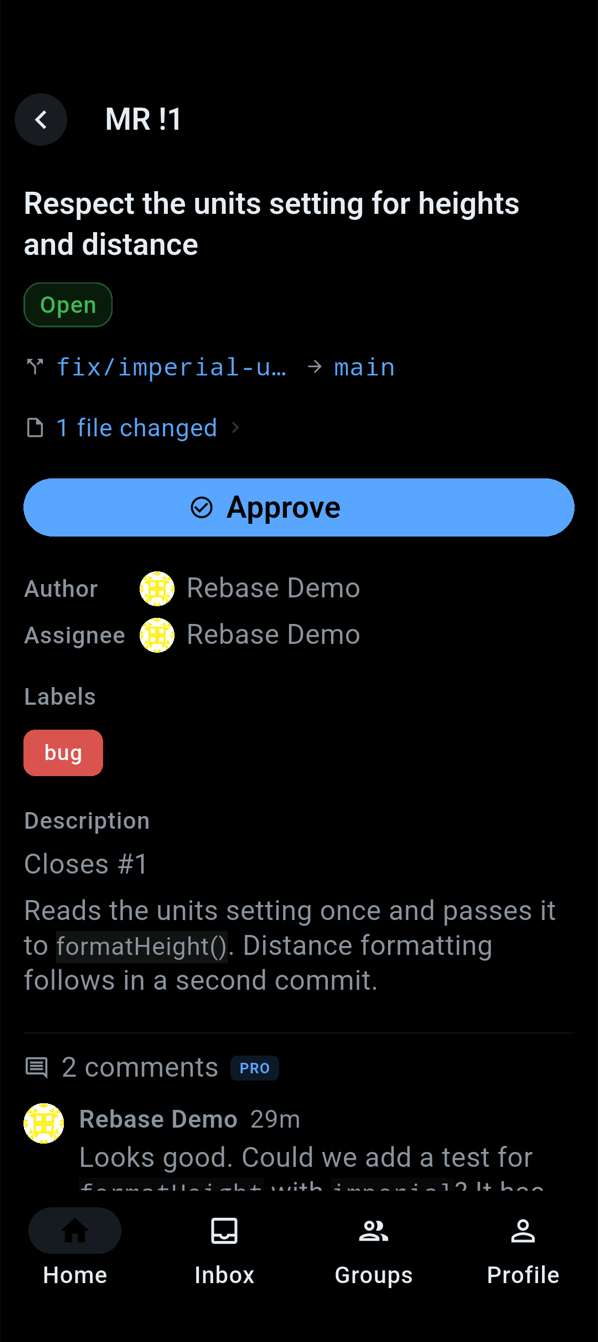
Diffs file by file, the whole discussion and its threads, reviewers, approvals and pipeline status. With Pro, approve, comment on a diff line, resolve threads and merge.
Follow pipelines live
Stages and jobs update while they run and a running job’s log grows as you read it. Watch a pipeline and Rebase lets you know when it finishes.
Your To-Dos, in one inbox
GitLab To-Dos filtered by type, project and reason; tap one to open the issue or merge request behind it. Pro marks them done, one at a time or all at once.
Every account, every instance
gitlab.com or a self-managed GitLab, with OAuth or a personal access token. Pro adds more accounts, work and personal or two servers, and switches between them instantly.
Made for iPad too
On iPad and Android tablets a side rail and list-and-detail panes keep the merge request beside the list it came from. Browse code with syntax highlighting, READMEs and commit history on any screen.
Free and Pro
Free
- One GitLab account, on gitlab.com or self-managed
- Projects, files, READMEs, commits, branches and members
- Issues and merge requests with comments, diffs and threads
- Pipelines, jobs and live logs, artifacts and test reports
- Your To-Do inbox, activity and global search
- Everything you opened before, offline
- Notifications for new To-Dos and watched pipelines
Pro adds
- Comment, reply and react; edit and delete your comments
- Approve, merge and rebase merge requests; comment on diff lines and resolve threads
- Create and edit issues and merge requests; set labels, assignees, reviewers and milestones
- Run, retry and cancel pipelines and jobs; start manual jobs
- Mark To-Dos done, star projects, create branches and set your status
- Add more GitLab accounts and switch between them
Pro is a one-time purchase, not a subscription. Reading stays free.
Help
Should I sign in with OAuth or a personal access token?
On gitlab.com, OAuth is the easy way: tap Sign in with GitLab and approve Rebase in the browser. A personal access token works on any GitLab, including a self-managed one without an OAuth application. Create one at <your GitLab>/-/profile/personal_access_tokens (on gitlab.com, gitlab.com/-/profile/personal_access_tokens) with the api, read_user and read_repository scopes, and paste it on the Access Token tab. Reading needs only read_api; api is what lets Pro make changes.
How do I connect a self-managed GitLab?
Choose Self-Hosted and enter your server’s address; Rebase needs GitLab 15.0 or later. Then paste a personal access token, or use OAuth with an application of your own: in GitLab open Preferences → Applications, add an application with the redirect URI rebase://oauth/callback and the api scope, leave Confidential unchecked, and paste its Application ID on Rebase’s OAuth tab. Rebase never asks for a client secret.
What does Rebase keep on my device, and how do I clear it?
Copies of the lists, issues, merge requests, pipelines, files and logs you opened, so they show at once and work offline; your sign-in token, in the device’s secure storage; and your favorites and settings. Your GitLab data goes only between the device and your GitLab server. Settings → Data on This Device shows each of these and has Clear Offline Copies, and signing out of an account deletes everything kept for it.
Why did a notification arrive late, or not at all?
Rebase has no server, so there is no push. It checks GitLab for new To-Dos and finished watched pipelines when you open it, every 15 minutes while it is open, and in the background when the system allows: about every half hour on Android, and on iOS only when iOS grants the time, which for an app you rarely open can be never. Treat notifications as a best-effort nudge. Turn them on in Settings → Notifications.
How do I restore Pro on a new phone or iPad?
Sign in to the same Apple ID or Google account you bought Pro with, then open Settings in Rebase and tap Restore Purchases. Pro belongs to the store account, not to a GitLab account, so it covers every GitLab account you add. Refunds are handled by Apple or Google.
Is Rebase made by GitLab?
No. Rebase is an independent app by 3LABS and is not affiliated with or endorsed by GitLab Inc. It talks to your GitLab only through GitLab’s own API, with the access you grant it.
Something isn’t working. How do I get help?
Tell me what you saw, which GitLab you use (gitlab.com or self-managed, and its version if you know it) and which device: contact 3LABS. Share Feedback in Rebase’s Settings opens the same page.